tags / .NET

.NET Tips

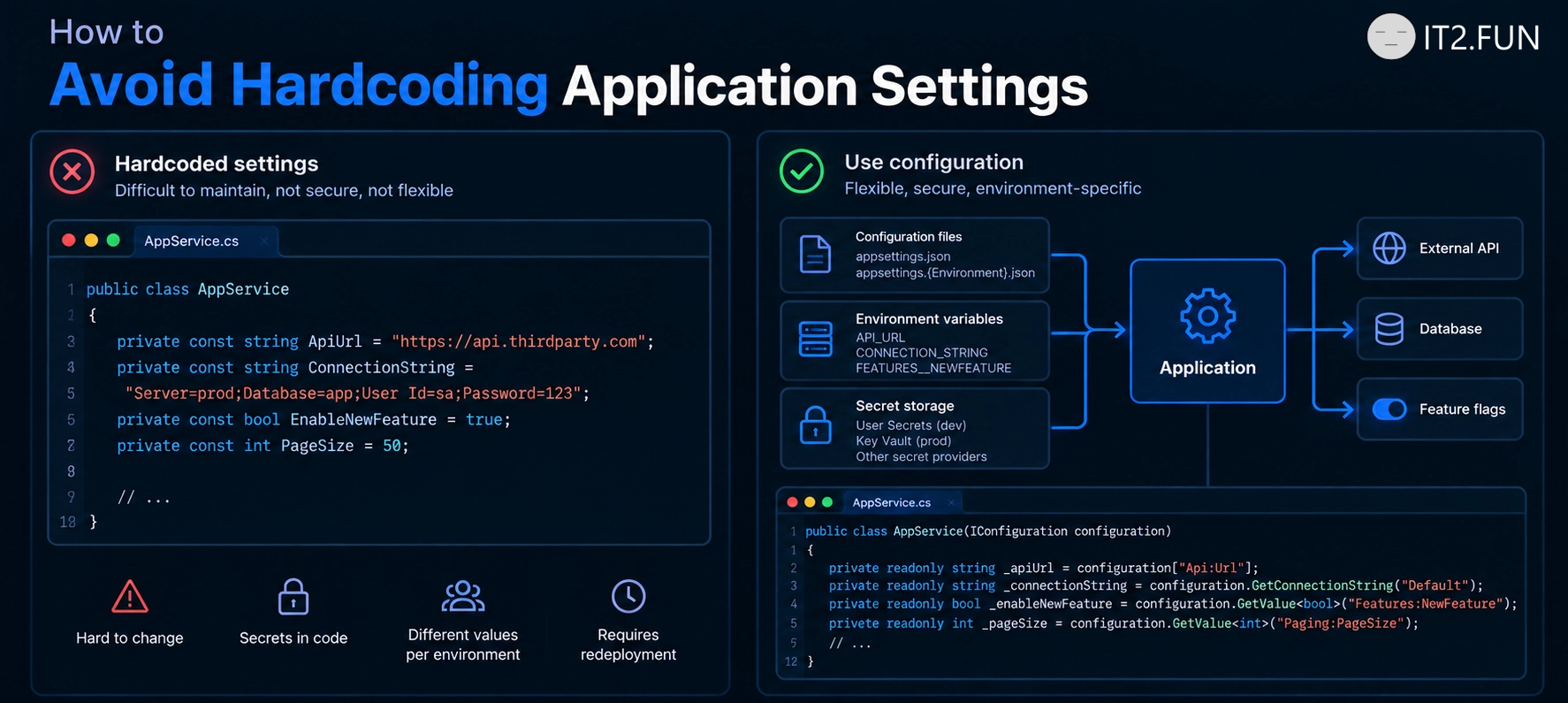
How to Read Configuration in ASP.NET Core

Need to access application settings?

Use IConfiguration

Common configuration sources:

  • appsettings.json
  • Environment variables
  • User Secrets
  • Azure Key Vault
  • Command-line arguments

ASP.NET Core automatically combines multiple configuration providers into a single configuration object.

How to Read Configuration in ASP.NET Core

How to Handle Errors in ASP.NET Core

Need to return a proper response when something goes wrong?

Use exception handling middleware.

How to Handle Errors in ASP.NET Core

Common approaches:

  • UseExceptionHandler()
  • Custom exception middleware
  • Return appropriate HTTP status codes
  • Log unexpected exceptions
  • Avoid exposing internal details

Centralized exception handling helps keep API responses consistent across your application.

How to Improve Code Quality

Common techniques:

  • Remove unused code
  • Use better names
  • Reduce duplication
  • Simplify logic
  • Fix bugs

Code quality often improves after these changes.

How to Secure an ASP.NET Core Endpoint

Want to protect an API endpoint?

How to Secure an ASP.NET Core Endpoint

Add the [Authorize] attribute.

Common authorization options:

  • [Authorize]
  • [Authorize(Roles = "Admin")]
  • [Authorize(Policy = "EmployeeOnly")]
  • [AllowAnonymous] for public endpoints
  • Configure authentication before using authorization

Protected endpoints require authenticated users before your action executes.

Public endpoints without [Authorize] are accessible without authentication.

How do you organize authorization in your APIs?

How to Increase Throughput

Consider parallel execution.

Common approaches:

  • Use Task.WhenAll()
  • Process independent tasks concurrently
  • Increase consumer instances
  • Batch operations when possible
  • Remove unnecessary bottlenecks

Parallel processing allows multiple operations to run at the same time rather than waiting for each to finish.

For example:

  • 10 API calls executed sequentially may take 10 seconds
  • 10 API calls executed in parallel may take around 1 second

Of course, parallelism isn't free. Databases, external APIs, and infrastructure still have limits.

But if your workload is independent, parallel execution is often one of the simplest ways to increase throughput.

What was the biggest throughput improvement you've achieved?

How to Increase Throughput

How to Prevent NullReferenceException

A NullReferenceException occurs when an object is null.

Possible solutions:

  • Check for null
  • Avoid null values
  • Initialize objects
  • Use nullable reference types
  • Handle exceptions

Objects that are not null tend to produce fewer null exceptions.

Microsoft Eliminates Async State Machines in .NET 11 to Protect Developers During Interviews

Microsoft announced Runtime Async in .NET 11, moving much of the async execution machinery from the C# compiler into the CoreCLR runtime.

The company mentioned on Microsoft Build that the change improves performance and simplifies asynchronous execution. It also appears to solve another long-standing problem.

"We noticed many developers use async/await every day, but struggle to explain how async state machines work during interviews."

For years, the C# compiler generated state machines behind every async method. Developers learned terms like MoveNext(), AsyncTaskMethodBuilder, and continuations, often hoping nobody would ask for more details.

With Runtime Async, interviewers are expected to update their question lists.

"State machines were one of our favorite topics," said one anonymous architect. "Now we'll have to return to covariance, contravariance, and memory models."

Microsoft confirmed developers should still understand asynchronous programming concepts.

How to Use SaveChangesAsync in .NET

Want asynchronous database writes in EF Core?

Use SaveChangesAsync() instead of SaveChanges().

How to Use SaveChangesAsync in .NET

Benefits:

  • Doesn't block the calling thread
  • Works better under load
  • Integrates with async/await
  • Recommended for ASP.NET Core applications
  • Available since EF Core was released

What other EF Core performance tips do you use?