tags / Performance

Performance tips and tricks

Your Retry Policy Might Be Multiplying an Outage

Retries improve resilience when failures are temporary.

They can also increase load exactly when a dependency is already struggling.
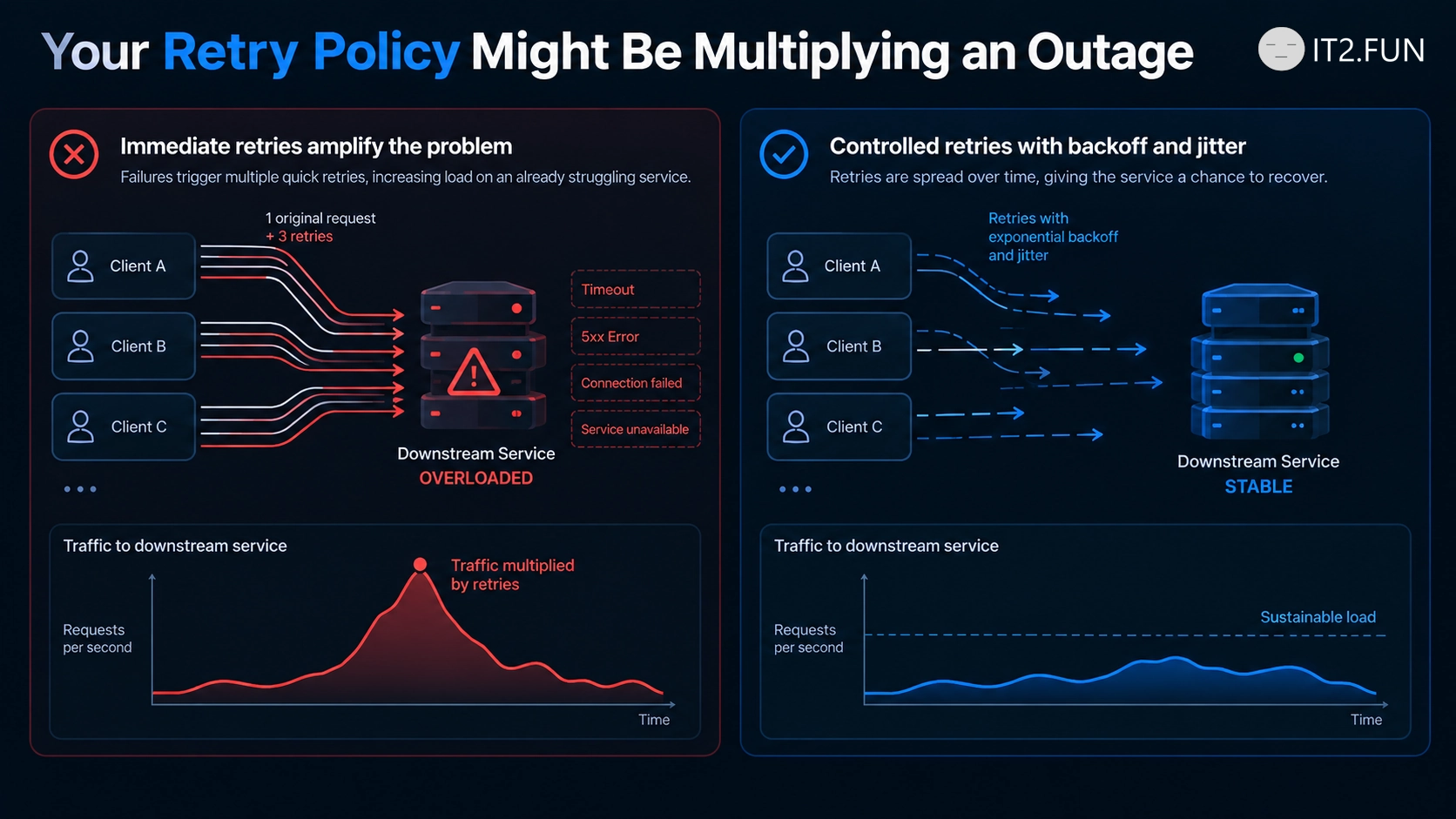
Imagine a service receiving:

1,000 requests/sec

The dependency starts failing.

Your policy retries every request three times.

Now the dependency might see something closer to:

Original traffic:  1,000
Retry #1:          1,000
Retry #2:          1,000
Retry #3:          1,000
                    -----
Potential traffic: 4,000 requests/sec

And that's before considering retries at multiple layers.

Service A retries Service B.

Service B retries Service C.

The client retries Service A.

A reliability mechanism can become a traffic multiplier.

Good retry policies usually consider:

  • Whether the failure is transient
  • Exponential backoff
  • Jitter
  • Maximum attempts
  • Retry budgets
  • Request deadlines
  • Retry-After guidance
  • Whether another layer is already retrying

Retries don't create capacity.

If a dependency is overloaded, sending it more requests immediately might not be the recovery strategy you want.

Retry when another attempt has a reasonable chance of succeeding.

Then give the dependency some time before asking again.
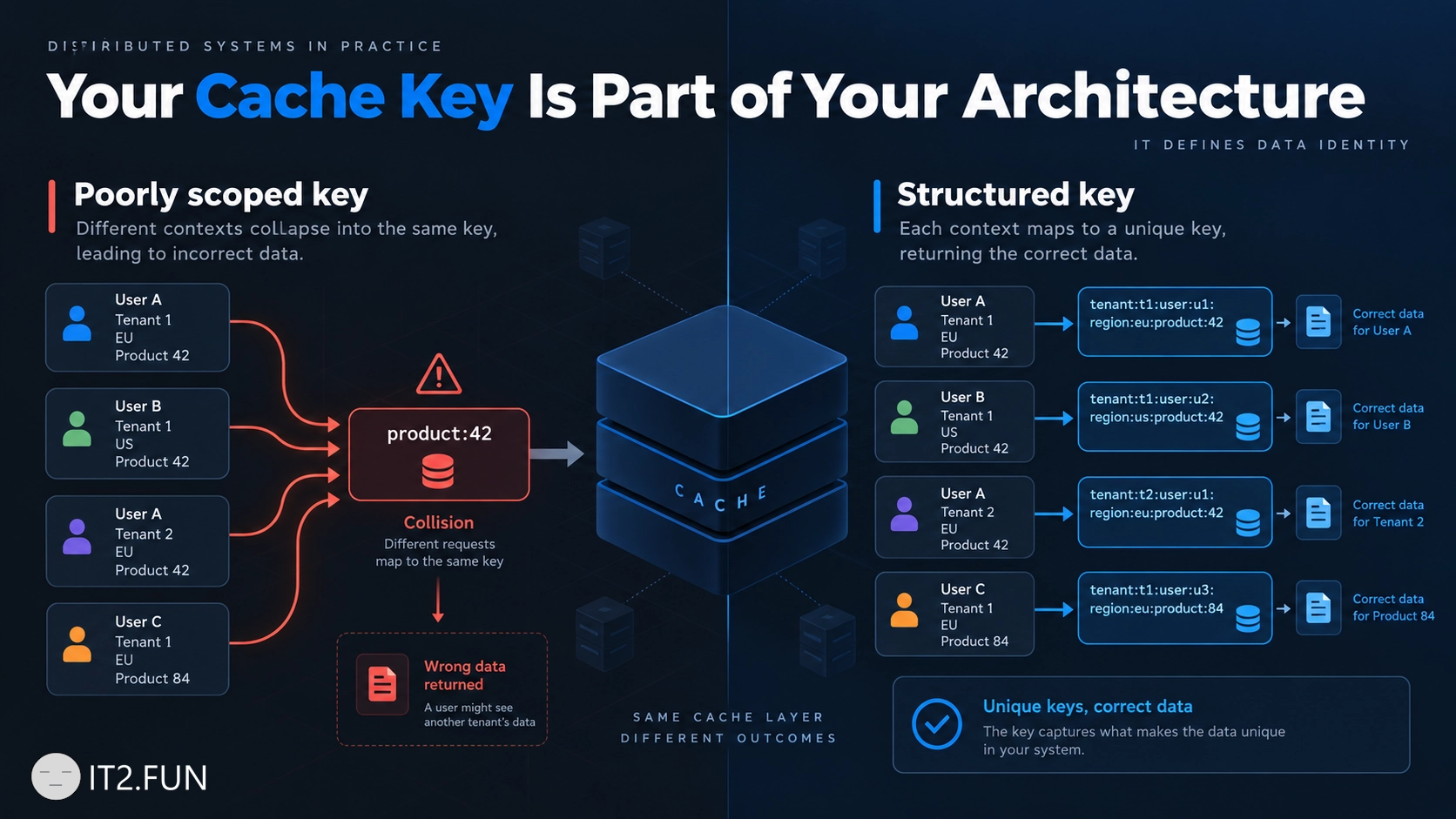
Your Cache Key Is Part of Your Architecture

Caching isn't only about deciding what data to store.

You also need to decide what makes that data unique.

Suppose you cache product information:

product:42

Looks reasonable.

Then you discover that the product 42 has different prices by country:

product:42:PL
product:42:DE

Then prices differ by currency:

product:42:PL:PLN
product:42:DE:EUR

Then the application becomes multi-tenant:

tenant:17:product:42:PL:PLN

Your cache key quietly contains assumptions about your data model.

It determines:

  • What data is considered equivalent
  • Which requests can share cached data
  • Tenant and user isolation
  • How invalidation works
  • Cache cardinality
  • Whether callers receive the correct result

A missing dimension can cause incorrect cache hits.

Too many dimensions can destroy your hit rate and create excessive cardinality.

Before writing:

cache.Set("products", value)

Ask what uniquely identifies the value you're caching.

Your cache doesn't understand your domain.

Your cache key has to explain it.

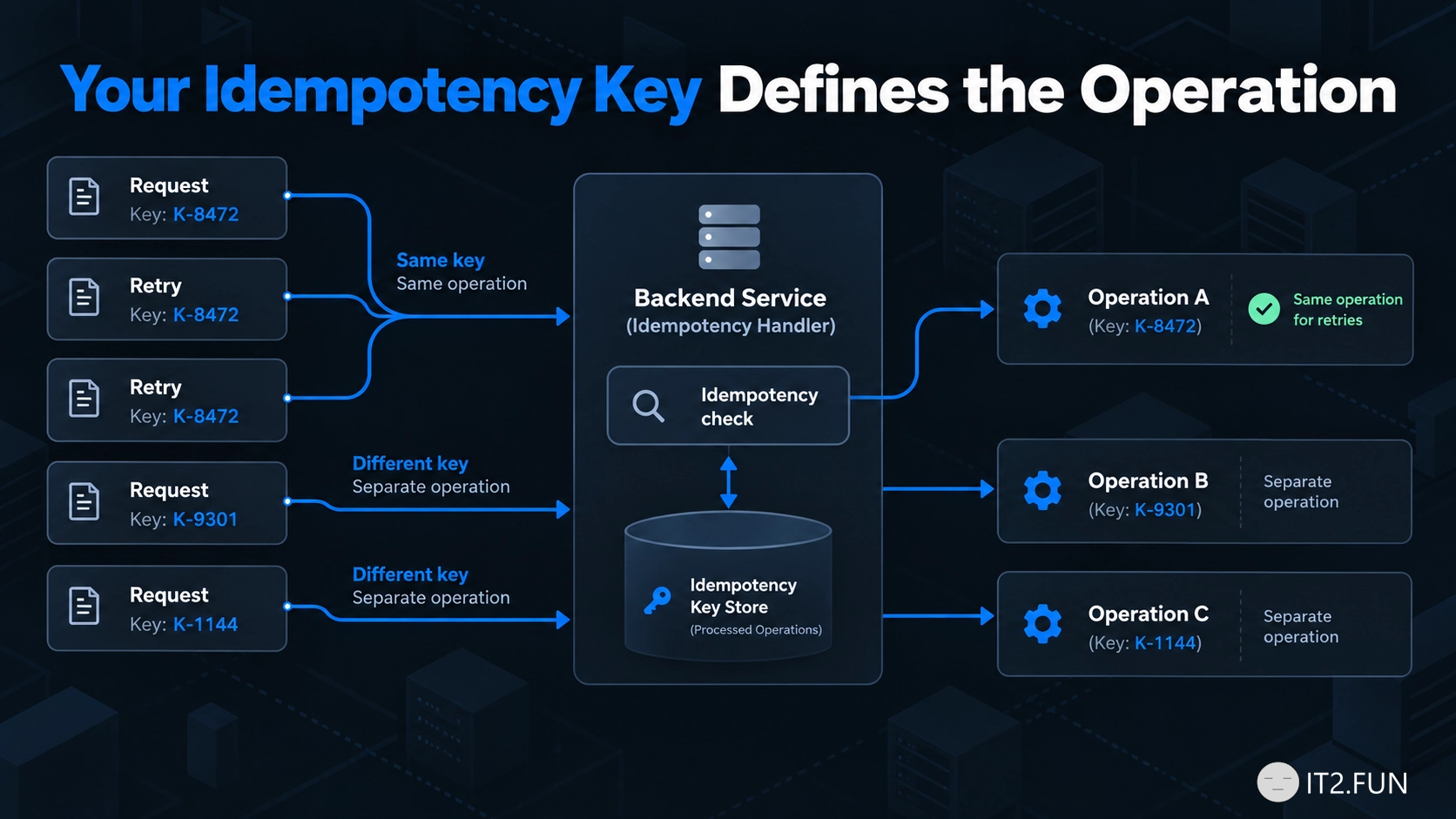
Your Idempotency Key Defines the Operation

Adding an idempotency key to an API doesn't automatically make the operation idempotent.

The key needs to identify the operation you want to execute once.

Your Idempotency Key Defines the Operation

Consider payment creation:

POST /payments
Idempotency-Key: order-123-payment

The client times out and retries:

POST /payments
Idempotency-Key: order-123-payment

The server recognizes the same logical operation and returns the previous result instead of creating another payment.

Now imagine generating a new key for every retry:

Request 1 → 7f9a...
Request 2 → 82bc...
Request 3 → a14e...

From the server's perspective, those are three different operations.

A good idempotency key should match the scope of the business operation.

Think about:

  • What exactly should happen once?
  • How long should the key remain valid?
  • Which caller owns the key?
  • Should the same key with different payloads be rejected?
  • Where is the result of the original operation stored?

Idempotency isn't about making requests unique.

It is about recognizing when multiple requests represent the same operation.

If every retry gets a new identity, the server has no reason to know it's a retry.

How to Make Slow Code Easier to Optimize

Application feels slow?

Before optimizing it, find out what is slow.

Use profiling, tracing, metrics, or benchmarks to measure where the application spends its time.

How to Make Slow Code Easier to Optimize

You might discover that a request spends:

Validation        4 ms
Business logic   12 ms
Database        680 ms
Serialization     8 ms

Optimizing 12 ms of business logic probably won't fix a 700 ms request.

Measure things like:

  • Execution time
  • Database calls
  • External requests
  • CPU usage
  • Memory allocations
  • Lock contention

Then optimize the part responsible for the problem.

Performance optimization becomes much easier once you know what needs to become faster.

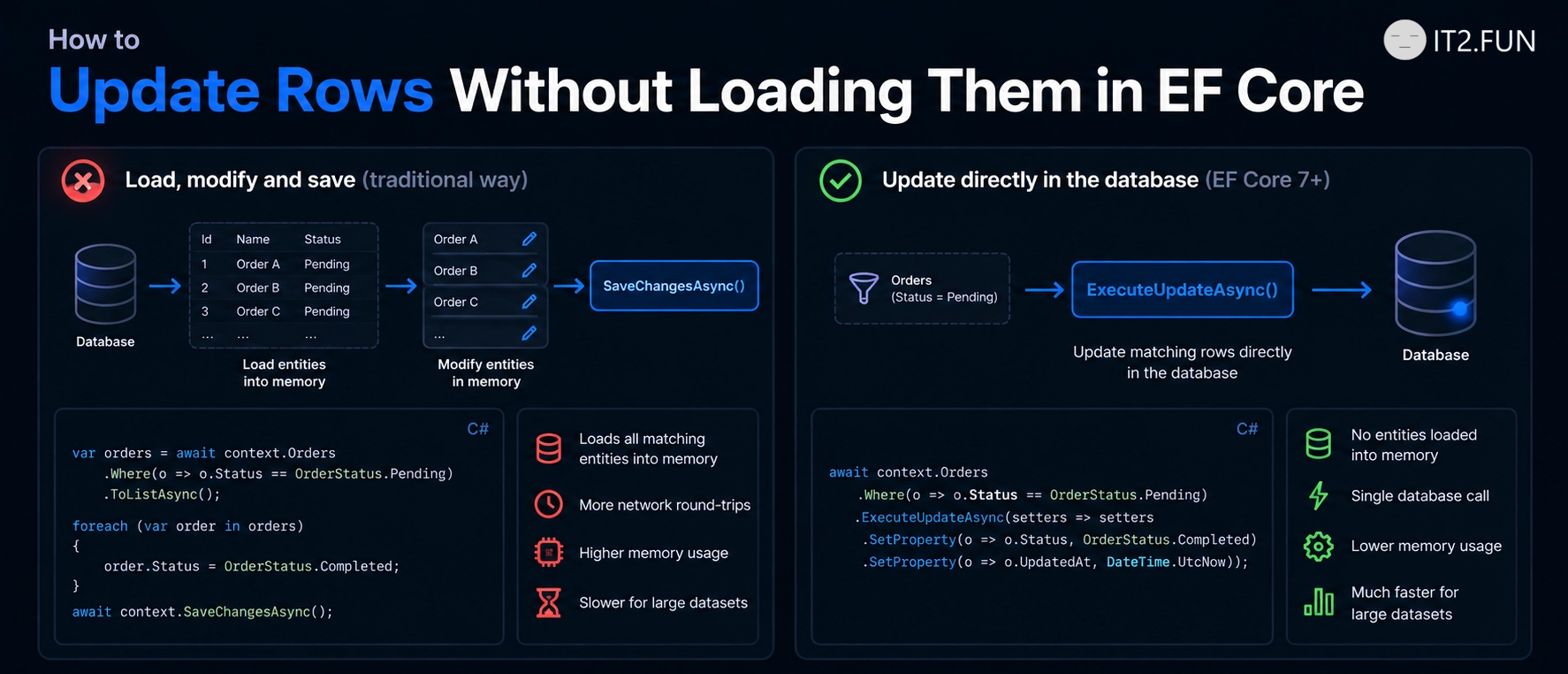
How to Update Rows Without Loading Them in EF Core

Need to update many rows in EF Core?

You don't always need to load them first.

Instead of:

var users = await context.Users
    .Where(x => !x.IsActive)
    .ToListAsync();

foreach (var user in users)
{
    user.Status = UserStatus.Disabled;
}

await context.SaveChangesAsync();

You can update matching rows directly:

await context.Users
    .Where(x => !x.IsActive)
    .ExecuteUpdateAsync(setters => setters
        .SetProperty(x => x.Status, UserStatus.Disabled));
How to Update Rows Without Loading Them in EF Core

ExecuteUpdateAsync() is useful when:

  • You need to update many rows
  • You don't need the entities in memory
  • You don't need change tracking
  • The update can be expressed as a database operation
  • You want to avoid unnecessary round trips and allocations

The update runs directly in the database.

If you don't need the entities, loading them before updating them is optional.

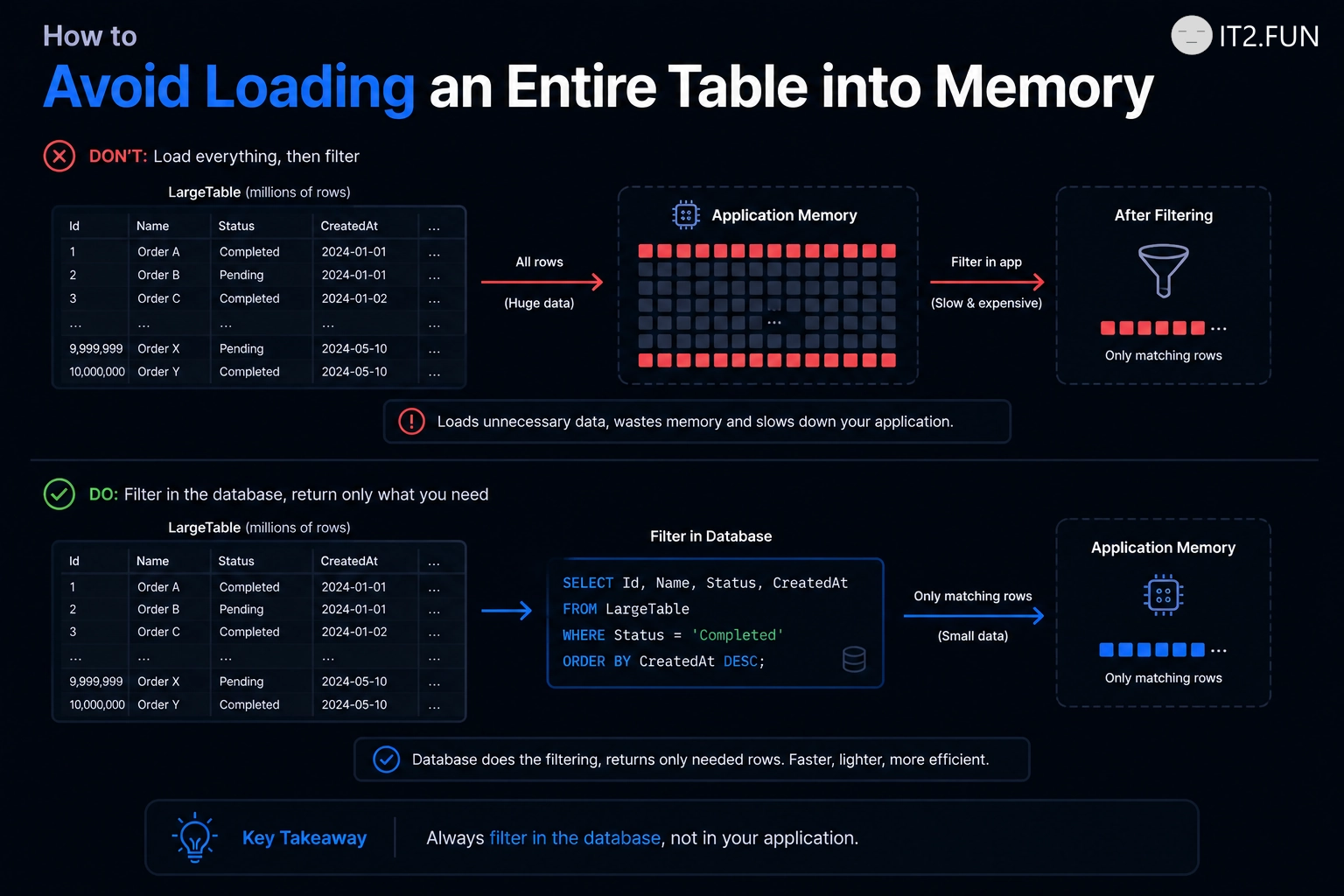
How to Avoid Loading an Entire Table into Memory

Need only active customers?

Filter them in the database.

Instead of:

var customers = await context.Customers.ToListAsync();

var activeCustomers = customers
    .Where(x => x.IsActive)
    .ToList();

Prefer:

var activeCustomers = await context.Customers
    .Where(x => x.IsActive)
    .ToListAsync();

The difference is where filtering happens.

How to Avoid Loading an Entire Table into Memory

The first approach:

  • Loads every row
  • Transfers every row
  • Stores every row in memory
  • Filters afterward

The second approach lets the database return the rows you requested.

If you need 100 customers from a table containing 1,000,000 rows, filtering before ToListAsync() tends to matter.

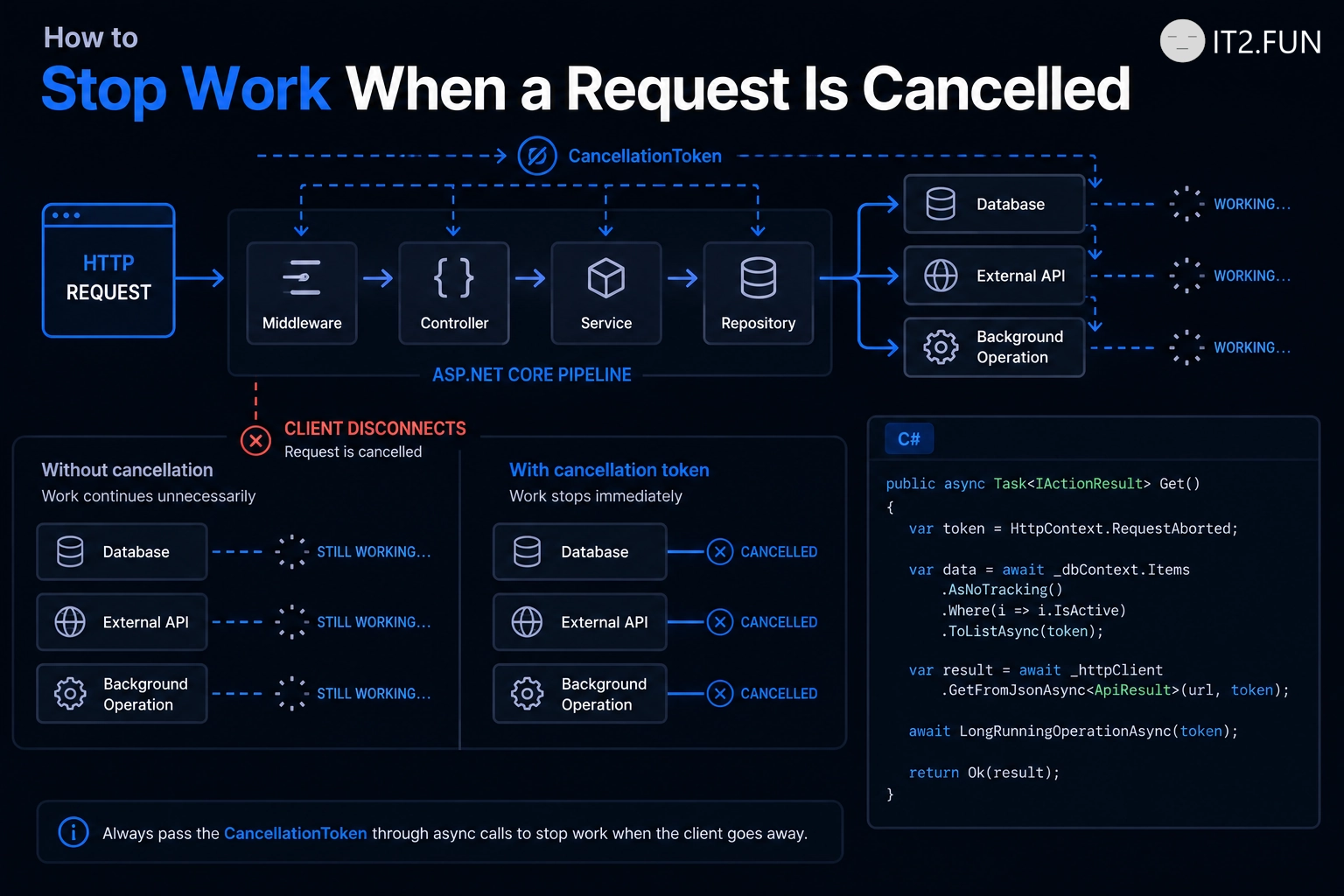
How to Stop Work When a Request Is Cancelled

Client disconnected while your API is still doing expensive work?

Pass the CancellationToken.

public async Task<IActionResult> GetOrders(
    CancellationToken cancellationToken)
{
    var orders = await context.Orders
        .ToListAsync(cancellationToken);

    return Ok(orders);
}

Propagate the token through operations that support cancellation:

  • Database queries
  • HTTP calls
  • Background operations
  • Delays
  • Long-running async workflows

Cancellation doesn't make every operation disappear immediately.

It signals downstream operations that the caller no longer needs the result.

If the request is gone, continuing work is often unnecessary.

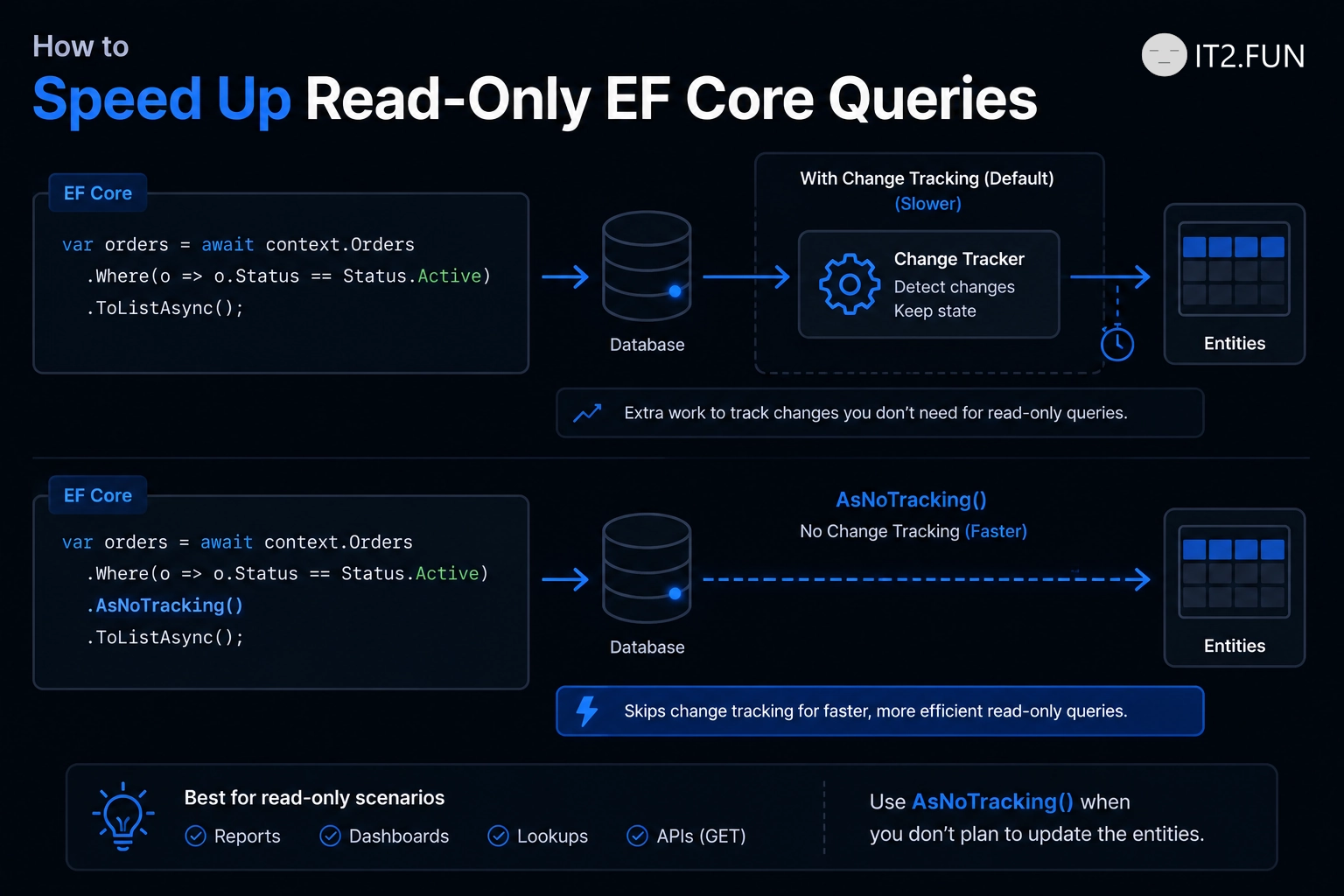
How to Speed Up Read-Only EF Core Queries

Reading data that you don't plan to update?

Consider AsNoTracking().

var products = await context.Products
    .AsNoTracking()
    .Where(x => x.IsActive)
    .ToListAsync();

By default, EF Core tracks entities so it can detect changes and persist them later.

For read-only scenarios, that tracking work might not be needed.

How to Speed Up Read-Only EF Core Queries

AsNoTracking() helps by:

  • Avoiding change tracking
  • Reducing tracking-related memory usage
  • Making the intent of the query explicit
  • Working well for API reads and reporting
  • Keeping read-only queries focused on reading

If you don't plan to change the entity, consider asking EF Core not to track changes.

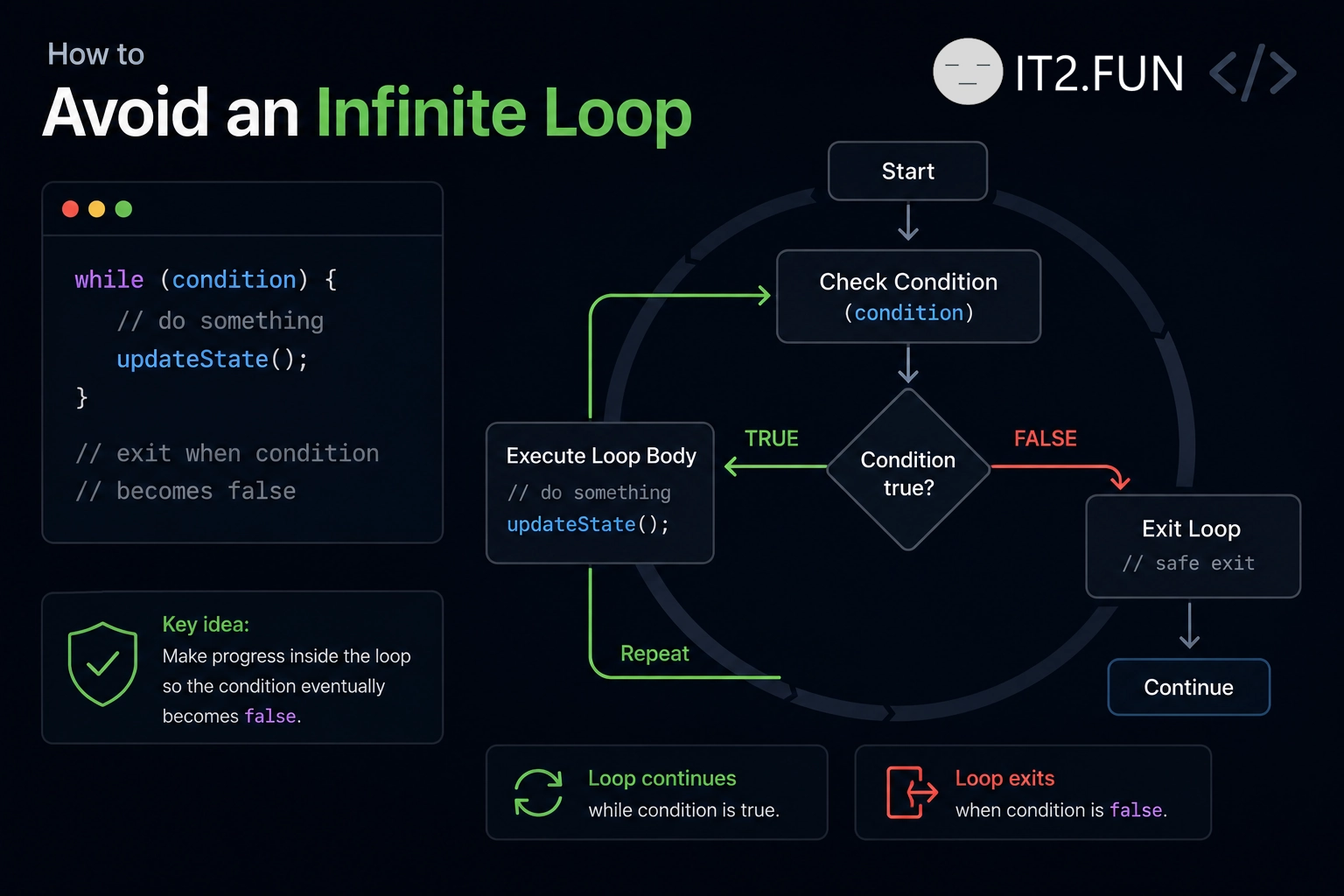
How to Avoid an Infinite Loop

Does your loop never stop?

Give it a condition that eventually becomes false.

How to Avoid an Infinite Loop

Things to check:

  • Make sure the condition changes
  • Increment your counter
  • Update variables used by the condition
  • Use break when appropriate
  • Avoid accidental while (true) loops

A loop continues while its condition evaluates to true.

If the condition stays true forever, the loop also runs forever.

How to Check If a Collection Contains an Item

Need to know whether a collection contains a specific item?

Use Contains.

How to Check If a Collection Contains an Item

Common examples:

  • Check whether a list contains a value
  • Check whether a set contains an item
  • Use the result in an if statement
  • Continue when the item exists
  • Handle the case when it doesn't

Contains returns true when the collection contains the specified item and false when it doesn't.

How do you check whether something exists in a collection?